Project
Voice AI Demo
Local-First Hybrid Conversational Voice AI Assistant
A local-first, hybrid conversational voice AI assistant powered by LiveKit Agents. VAD, STT, and LLM run locally with Apple Silicon acceleration; default Edge-TTS sends response text to Microsoft Edge's online text-to-speech service.
- LiveKit Agents
- FastAPI
- Python 3.12
- Next.js 15
- React 19
- Tailwind CSS 4
- Whisper
- Ollama
- Edge-TTS
- Docker
- WebRTC
Key Features
Real-Time Voice Conversation
Low-latency WebRTC audio transport via LiveKit. Sub-2s voice-to-voice latency was observed in local development on Apple Silicon; it is not a controlled cross-hardware benchmark and not a guarantee.
Local-First Hybrid
VAD, STT, and LLM run locally using Silero, faster-whisper, and Ollama. The default Edge-TTS provider sends generated response text to Microsoft's online service, not the captured audio.
Configurable AI Pipeline
Swap STT, LLM, and TTS providers at runtime via .env. The TTS provider is swappable, including a switch from Edge-TTS to Cartesia or another configured provider.
Apple Silicon Optimized
Metal GPU acceleration for Whisper, Llama, and other models. Runs efficiently on MacBook hardware with minimal resource usage.
Architecture
- LiveKit Agents SDK 1.5 for voice pipeline orchestration
- FastAPI for JWT token generation and health check endpoints
- Silero VAD for speech segment and utterance boundary detection
- faster-whisper for local STT transcription (large-v3-turbo)
- Ollama with llama3.2:3b for local LLM inference
- Default Edge-TTS sends response text to Microsoft Edge's online service for speech synthesis
- Docker-based LiveKit WebRTC SFU for media routing
- SafeSTT/SafeLLM/SafeTTS wrappers for graceful error handling
Diagrams
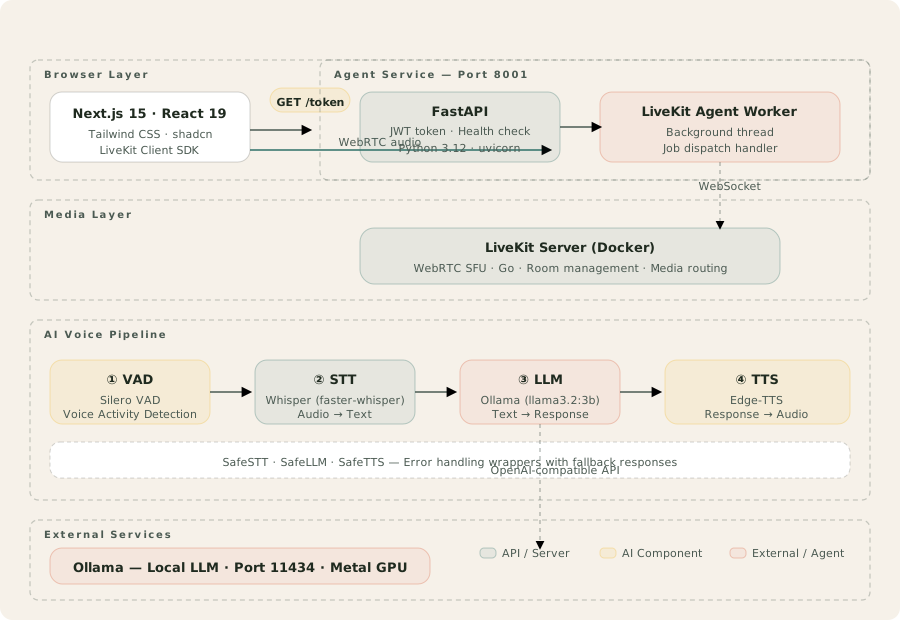
Four tiers: browser layer (Next.js 15 + LiveKit SDK), agent service (FastAPI + LiveKit Agent Worker), media layer (LiveKit Server in Docker), and AI voice pipeline (VAD → STT → LLM → TTS) with Safe wrappers for resilience.
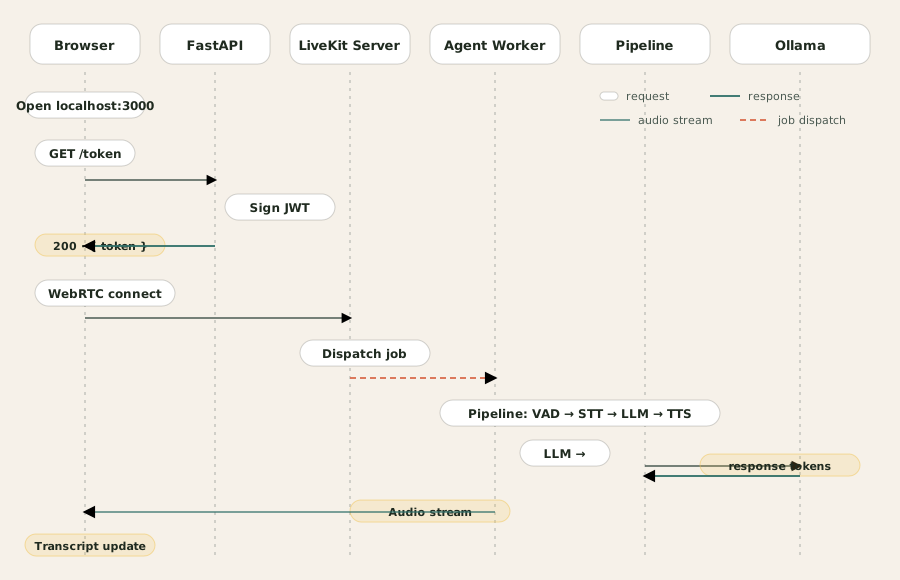
Browser requests a JWT token from FastAPI, then connects to LiveKit via WebRTC. LiveKit dispatches a job to the Agent Worker which runs the voice pipeline — VAD, STT, LLM (Ollama), and TTS — and streams audio back through LiveKit to the browser.
API Usage
# 1. Start LiveKit Server
docker compose up -d

# 2. Pull LLM model
ollama pull llama3.2:3b

# 3. Start Agent Service
cd agent && python -m venv .venv
source .venv/bin/activate
pip install -r requirements.txt
python main.py --test-mode  # or without --test-mode for real models

# 4. Start Frontend
cd frontend && npm install && npm run dev

# Open http://localhost:3000
4-Stage Voice Pipeline
VAD (Voice Activity Detection)
Detects speech segments and utterance boundaries using Silero VAD
SileroVAD.detect_voice(audio_chunk) → speech_segmentsSTT (Speech-to-Text)
Transcribes audio to text using local faster-whisper model (large-v3-turbo)
WhisperSTT.transcribe(audio) → "Hello, how can I help you?"LLM (Language Model)
Generates natural language responses via Ollama with OpenAI-compatible API
OllamaLLM.generate(prompt) → "I can help you with that!"TTS (Text-to-Speech)
Sends response text to Microsoft Edge's online TTS service and returns synthesized audio
EdgeTTS.synthesize(text) → audio_bytesProvider Switching
Groq LLM
LLM_PROVIDER=openai_compatible · LLM_MODEL=llama-3.3-70b-versatile
OpenAI STT
STT_PROVIDER=openai_compatible · STT_MODEL=whisper-1
Cartesia TTS
TTS_PROVIDER=openai_compatible · TTS_MODEL=sonic-2
Impact
Sub-2s voice-to-voice latency was observed in local development on Apple Silicon; it is not a controlled cross-hardware benchmark and not a guarantee. VAD, STT, and LLM stayed local, with an explicit online boundary for default Edge-TTS.
4-stage
Voice Pipeline
Real-time
WebRTC Streaming
3 local
VAD, STT & LLM Stages
Want something like this built for you?
Tell me about it. I reply within one working day with a first take and no sales pitch.