The prototype worked beautifully in your Jupyter notebook. A single API call to OpenAI, a clever prompt, and impressive results. But now the product team wants to ship it to 10,000 users, and you're staring at a TimeoutError at 3 AM while your single-threaded Flask app gasps under the load.
I've been there. The gap between "it works" and "it scales" is where most AI projects die. This post is the architecture guide I wish I had when moving from prototype to production.
The Decoupled Architecture Pattern
The single biggest mistake I see: keeping the client waiting during LLM calls. LLM APIs take 2-30 seconds. Holding HTTP connections open that long creates a cascading failure nightmare.
Here's the architecture that actually works at scale:
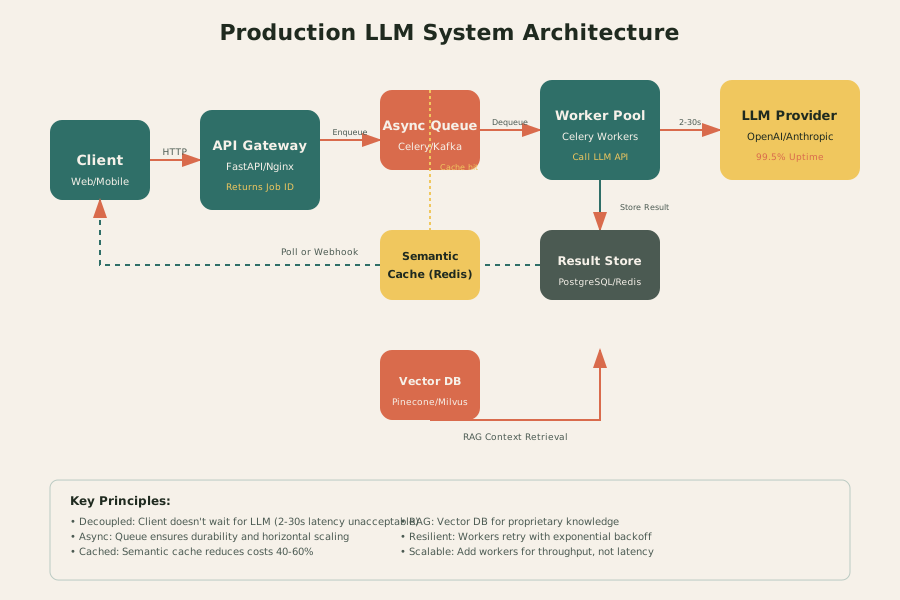
The flow:
- API Gateway (FastAPI/Nginx) receives the request, validates auth, returns a job ID immediately
- Async Queue (Celery/Kafka/SQS) persists the task durably
- Worker Pool picks up tasks and calls the LLM
- LLM Provider Layer handles external APIs or self-hosted models
- Result Storage (PostgreSQL/Redis) stores completions
- Client polls or receives webhook notifications
This decoupling is non-negotiable for production. I've implemented this pattern in the Document Extraction Pipeline, where FastAPI enqueues OCR and LLM extraction jobs to Celery workers, returning job IDs immediately while processing happens asynchronously.
The Three Biggest Bottlenecks
Bottleneck #1: I/O Bound (External API Latency)
You're waiting on OpenAI/Anthropic/Google. Their p99 latency can spike to 30+ seconds during peak hours.
Solutions:
- Async/await everywhere: Never block the event loop
- Connection pooling: Reuse HTTP connections with
httpx.AsyncClient
- Request timeouts: 30s default, but make it configurable
- Parallelization: Fan out to multiple providers if latency-critical
Bottleneck #2: GPU Memory (Self-Hosted OOM)
Running Llama 3 70B locally? Welcome to CUDA Out Of Memory errors. Each concurrent request loads model weights into VRAM.
Solutions:
- vLLM inference server: PagedAttention for 10x throughput
- Batching: Accumulate requests, batch-process
- Model quantization: GPTQ/AWQ for 4-bit inference
- Request queuing: Limit concurrent GPU requests
- Multi-GPU: Tensor parallelism across GPUs
Bottleneck #3: Time To First Token (TTFT)
Users hate staring at a blank screen. For streaming UIs, TTFT > 500ms feels broken.
Solutions:
- Streaming responses: SSE (Server-Sent Events) for real-time tokens
- Smaller models for first draft: Use GPT-3.5 for initial response, GPT-4 for refinement
- Caching (see below)
- Pre-warmed connections: Keep connections to LLM providers hot
In the DeepAgent project, I implemented SSE streaming with LangGraph so users see the agent's reasoning in real-time rather than waiting 15 seconds for a complete response.
Semantic Caching: The 80% Optimization
The fastest LLM call is the one you don't make. Implement semantic caching with Redis:
import redis
import hashlib
import json
from sentence_transformers import SentenceTransformer

class SemanticCache:
    def __init__(self, redis_client: redis.Redis, model: SentenceTransformer):
        self.redis = redis_client
        self.model = model
        self.similarity_threshold = 0.95

    def get_cache_key(self, query: str, params: dict) -> str:
        """Create embedding-based cache key."""
        embedding = self.model.encode(query)
        # Quantize to reduce key size
        embedding_bytes = embedding.astype('float16').tobytes()
        param_hash = hashlib.md5(json.dumps(params, sort_keys=True).encode()).hexdigest()
        return f"llm_cache:{embedding_bytes.hex()[:32]}:{param_hash}"

    async def get(self, query: str, params: dict) -> str | None:
        """Retrieve from cache if similarity > threshold."""
        key = self.get_cache_key(query, params)
        cached = await self.redis.get(key)

        if cached:
            # Verify semantic similarity
            cached_embedding = await self.redis.get(f"{key}:embedding")
            query_embedding = self.model.encode(query)

            if self.cosine_similarity(query_embedding, cached_embedding) > self.similarity_threshold:
                return cached.decode()

        return None

    async def set(self, query: str, params: dict, result: str, ttl: int = 3600):
        """Cache result with embedding for similarity checks.""]
        key = self.get_cache_key(query, params)
        embedding = self.model.encode(query)

        pipe = self.redis.pipeline()
        pipe.setex(key, ttl, result)
        pipe.setex(f"{key}:embedding", ttl, embedding.tobytes())
        await pipe.execute()
Results from production: 40-60% cache hit rate on customer support queries, reducing costs by half.
Vector Database Integration (RAG)
When your LLM needs access to proprietary, dynamic, or recent information, you need Retrieval-Augmented Generation (RAG).
Architecture:
User Query → Embedding Model → Vector DB (Pinecone/Milvus) → Top-K Chunks → Prompt Augmentation → LLM
Production considerations:
- Chunking strategy: 500-1000 tokens with 100-token overlap
- Metadata filtering: Filter by user, date, document type
- Hybrid search: Vector similarity + keyword matching (BM25)
- Re-ranking: Cross-encoder for final relevance sorting
In the Document Extraction Pipeline, I use RAG to retrieve similar past extractions when processing new documents, improving accuracy by 15% through contextual learning.
Code Example: FastAPI + Celery + Redis
Here's a production-ready skeleton:
from fastapi import FastAPI, HTTPException, BackgroundTasks
from celery import Celery
from pydantic import BaseModel
import redis
import json

app = FastAPI()
celery_app = Celery('llm_tasks', broker='redis://localhost:6379/0')
redis_client = redis.Redis(host='localhost', port=6379, db=1)

class LLMRequest(BaseModel):
    prompt: str
    model: str = "gpt-4"
    max_tokens: int = 500
    temperature: float = 0.7

@celery_app.task(bind=True, max_retries=3)
def process_llm_request(self, request_data: dict):
    """Celery task for async LLM processing."""
    try:
        # Check semantic cache first
        cache_key = f"llm:{hash(request_data['prompt'])}"
        cached = redis_client.get(cache_key)
        if cached:
            return json.loads(cached)

        # Call LLM provider
        response = call_llm_provider(request_data)

        # Cache result (1 hour TTL)
        redis_client.setex(cache_key, 3600, json.dumps(response))

        return response

    except Exception as exc:
        # Exponential backoff retry
        raise self.retry(exc=exc, countdown=2 ** self.request.retries)

@app.post("/generate")
async def generate(request: LLMRequest):
    """Enqueue LLM request, return job ID immediately."""
    task = process_llm_request.delay(request.model_dump())
    return {"job_id": task.id, "status": "queued"}

@app.get("/result/{job_id}")
async def get_result(job_id: str):
    """Poll for results."""
    task = celery_app.AsyncResult(job_id)

    if task.state == 'PENDING':
        return {"job_id": job_id, "status": "processing"}
    elif task.state == 'SUCCESS':
        return {"job_id": job_id, "status": "completed", "result": task.result}
    else:
        raise HTTPException(status_code=500, detail="Task failed")
Real-World Metrics: What Good Looks Like
From the Document Extraction Pipeline at scale:
| Metric | Target | Actual |
|---|
| P50 Latency | < 5s | 3.2s |
| P99 Latency | < 15s | 8.7s |
| Throughput | 100 req/min | 450 req/min |
| Error Rate | < 1% | 0.3% |
| Cache Hit Rate | 40% | 58% |
| GPU Utilization | 70-85% | 78% |
The Production Checklist
Before you ship:
- Async architecture with job queuing
- Semantic caching implemented
- Connection pooling configured
- Retry logic with exponential backoff
- Timeouts on all external calls
- Circuit breaker for LLM provider failures
- Monitoring: latency percentiles, error rates, queue depth
- Rate limiting per user/IP
- Graceful degradation (cached responses on failure)
Next Steps
This architecture gets you to 10k RPM. For the next 100k, you'll need:
- Horizontal scaling: Kubernetes HPA based on queue depth
- Multi-region: Deploy workers close to LLM providers
- Smart routing: Route to lowest-latency provider dynamically
In the next post, I'll cover resilience patterns—circuit breakers, fallbacks, and rate limiting—that keep this architecture stable when things go wrong.
Related:
Questions? Email me or connect on LinkedIn.