Every time a user has to re-explain their preferences, your agent feels like it never learned anything.
"I told you last time I want bullet points, not paragraphs." "I said I'm a senior engineer — please stop explaining what a function is." "When I'm analysing data, I want tables. When I'm drafting a document, I want prose."
These are not edge cases. They are the default experience of working with a stateless AI agent. Each new session resets every preference the user has ever expressed. The agent has no memory of who this person is, how they work, or what they have already told it.
Mem0 solves this at the infrastructure level — a memory layer that persists across sessions, searches semantically, and can be queried with metadata filters. But the interesting engineering problem is not that you can store preferences. It is what to store, how to tag it, and when to retrieve it — especially when a user switches between completely different types of tasks in the same conversation.
What to Store as User Preferences
Not everything a user says should be stored as a preference. You want to store information that will change how you respond in the future — not just what was discussed.
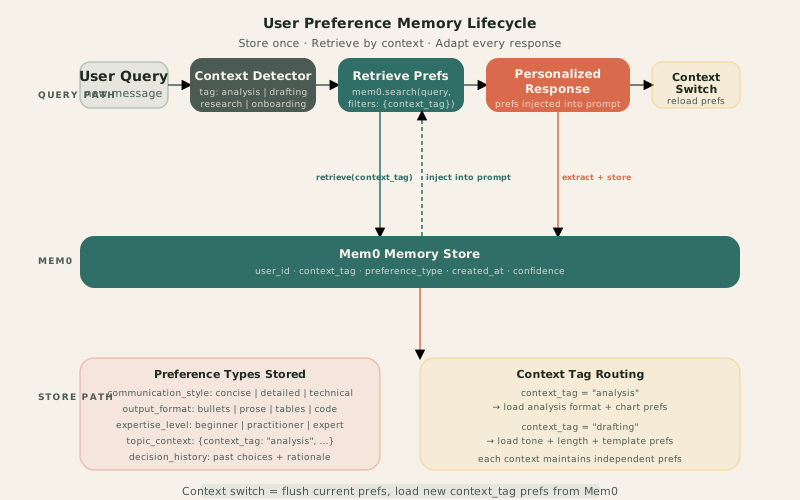
Five categories are useful in practice:
Communication style. Does this user want concise answers or detailed explanations? Technical language or plain English? Do they push back when you hedge with "it depends"? These preferences cut across every topic — they shape every response regardless of context.
Output format. Bullet points or prose? Tables for comparisons? Code blocks for examples? Some users scan; some read. Some are in a situation where they'll paste your output into a document; others are skimming on a phone. Format preferences are often the first thing a user corrects and the easiest to store.
Expertise level. A senior practitioner in one domain and a complete beginner in another. Getting this wrong is costly — over-explain to an expert and they stop trusting you; under-explain to a beginner and they get lost. Store domain-specific expertise levels, not a single global "expertise" flag.
Topic-specific context. "When we discuss contracts, I always care about liability clauses first." "For this client specifically, budget is the constraint, not timeline." These are contextual preferences tied to a specific domain or task — they should be stored and retrieved when that context is active, not on every query.
Decision history. "I decided last quarter not to use approach X because of Y." Past decisions and their rationale are a form of preference: they tell the agent what paths have already been explored and rejected. Surfacing them prevents the agent from re-suggesting something the user already ruled out.
Storing Preferences with Mem0
Mem0's storage API is intentionally simple. The interesting design decision is the metadata schema — specifically the context_tag field, which controls which preferences get retrieved for which situations.
Explicit extraction
When a user directly states a preference, extract and store it immediately:
from mem0 import MemoryClient

mem0 = MemoryClient(host="http://mem0-api:8000", api_key=os.getenv("MEM0_JWT_SECRET"))

async def store_preference(
    text: str,
    user_id: str,
    preference_type: str,
    context_tag: str = "global",
    confidence: float = 1.0,
) -> None:
    mem0.add(
        data=text,
        user_id=user_id,
        metadata={
            "preference_type": preference_type,
            "context_tag": context_tag,
            "confidence": confidence,
            "source": "explicit",
        },
    )
Example calls based on what a user says:
# "Always give me bullet points"
await store_preference(
    text="User prefers bullet points over prose in all responses",
    user_id=user_id,
    preference_type="output_format",
    context_tag="global",
)

# "When I'm doing data analysis, I want tables for comparisons"
await store_preference(
    text="When context is data analysis, use tables for comparisons and numeric data",
    user_id=user_id,
    preference_type="output_format",
    context_tag="analysis",
)

# "I'm a senior Go engineer but new to ML"
await store_preference(
    text="Expert in Go and systems programming; beginner in ML and data science",
    user_id=user_id,
    preference_type="expertise_level",
    context_tag="global",
)
The context_tag distinguishes global preferences (apply everywhere) from context-specific ones (only apply in a particular mode). A "global" tag is retrieved in every context; a "analysis" tag is retrieved only when the agent detects the user is doing data analysis.
Implicit extraction
Not all preferences are stated directly. A user who consistently rephrases long answers into shorter ones is expressing a preference. A user who always asks follow-up questions about a specific aspect is signalling what they care about.
Implicit extraction runs as a post-processing step after each response cycle:
IMPLICIT_EXTRACTION_PROMPT = """Analyse this interaction. Did the user express or imply any preferences
about how they want to be communicated with? Consider: format preferences, detail level,
what they asked follow-up questions about, any corrections they made.

If you find a preference, return: {{"found": true, "preference": "...", "type": "...", "context_tag": "..."}}
If none: {{"found": false}}

User message: {user_message}
Agent response: {agent_response}
User follow-up: {followup}"""

async def extract_implicit_preference(interaction: dict) -> dict | None:
    response = await claude.messages.create(
        model="claude-haiku-4-5-20251001",
        max_tokens=200,
        messages=[{"role": "user", "content": IMPLICIT_EXTRACTION_PROMPT.format(**interaction)}],
    )
    result = json.loads(response.content[0].text)
    return result if result.get("found") else None
Use claude-haiku for this — it is fast and cheap for structured extraction on short interactions. Implicit preferences get a "confidence": 0.6 versus 1.0 for explicit ones, so you can weight them differently at retrieval time.
Retrieving Preferences and Injecting into Context
Before any substantive response, retrieve preferences relevant to the current context and inject them into the system prompt.
async def retrieve_preferences(
    query: str,
    user_id: str,
    context_tag: str,
    limit: int = 8,
) -> list[dict]:
    """Retrieve both global and context-specific preferences."""
    global_prefs = mem0.search(
        query=query,
        user_id=user_id,
        filters={"context_tag": "global"},
        limit=limit // 2,
    )
    context_prefs = mem0.search(
        query=query,
        user_id=user_id,
        filters={"context_tag": context_tag},
        limit=limit // 2,
    )
    return global_prefs.get("results", []) + context_prefs.get("results", [])
Two searches: one for global preferences, one for context-specific. This ensures communication style preferences (global) are always included, while only loading context-relevant preferences for the current task.
Prompt injection
Structure the system prompt so preferences are clearly separated from task instructions:
def build_personalized_system_prompt(
    base_prompt: str,
    preferences: list[dict],
) -> str:
    if not preferences:
        return base_prompt

    pref_lines = "\n".join(f"- {p['memory']}" for p in preferences)
    preference_block = f"""
## User Preferences (apply to this response)
{pref_lines}

These preferences were learned from previous interactions with this user.
Apply them unless the user's current request explicitly overrides them.
"""
    return base_prompt + preference_block
The key instruction — "unless the user's current request explicitly overrides them" — prevents preferences from becoming constraints. A user who generally wants bullet points but asks "write me a paragraph about X" should get a paragraph, not bullets.
Context Switching
Context switching is the moment a user moves from one type of task to another in the same session. The agent needs to detect this shift and load the appropriate preference set.
Common context transitions:
- Research → document drafting (from information gathering to writing)
- Data analysis → client communication (from technical to non-technical register)
- Planning → execution (from high-level to step-by-step)
Detecting context
A lightweight LLM call classifies the intent before retrieval:
CONTEXT_TAGS = ["analysis", "drafting", "research", "planning", "review", "onboarding"]

CONTEXT_DETECTION_PROMPT = """Classify this user message into one of these contexts: {tags}.
Return only the tag. If unclear, return the most likely one.

Message: {message}"""

async def detect_context(message: str) -> str:
    response = await claude.messages.create(
        model="claude-haiku-4-5-20251001",
        max_tokens=20,
        messages=[{"role": "user", "content": CONTEXT_DETECTION_PROMPT.format(
            tags=", ".join(CONTEXT_TAGS),
            message=message,
        )}],
    )
    tag = response.content[0].text.strip().lower()
    return tag if tag in CONTEXT_TAGS else "research"
Handling the switch in LangGraph
The agent state carries the active context_tag. When it changes, the previous context's preference cache is flushed and new preferences are loaded:
from langgraph.graph import StateGraph, END
from typing import TypedDict

class AgentState(TypedDict):
    query: str
    user_id: str
    context_tag: str
    previous_context_tag: str
    preferences: list[dict]
    response: str

async def detect_and_load_context(state: AgentState) -> AgentState:
    new_tag = await detect_context(state["query"])
    context_changed = new_tag != state.get("context_tag", "")

    if context_changed or not state.get("preferences"):
        preferences = await retrieve_preferences(
            query=state["query"],
            user_id=state["user_id"],
            context_tag=new_tag,
        )
    else:
        preferences = state["preferences"]  # reuse if same context

    return {
        **state,
        "previous_context_tag": state.get("context_tag", ""),
        "context_tag": new_tag,
        "preferences": preferences,
    }

async def generate_response(state: AgentState) -> AgentState:
    system_prompt = build_personalized_system_prompt(BASE_PROMPT, state["preferences"])
    # ... agent execution
    return {**state, "response": result}

async def update_preferences(state: AgentState) -> AgentState:
    implicit = await extract_implicit_preference({
        "user_message": state["query"],
        "agent_response": state["response"],
        "followup": "",
    })
    if implicit:
        await store_preference(
            text=implicit["preference"],
            user_id=state["user_id"],
            preference_type=implicit["type"],
            context_tag=state["context_tag"],
            confidence=0.6,
        )
    return state

# Build the graph
graph = StateGraph(AgentState)
graph.add_node("detect_context", detect_and_load_context)
graph.add_node("generate", generate_response)
graph.add_node("update_prefs", update_preferences)

graph.add_edge("detect_context", "generate")
graph.add_edge("generate", "update_prefs")
graph.add_edge("update_prefs", END)
graph.set_entry_point("detect_context")
The context_changed check in detect_and_load_context is important: reloading preferences on every turn is wasteful if the user is mid-task in the same context. Only reload when the tag changes.
Advanced Patterns
Preference conflict resolution
A user might give contradicting instructions across sessions: "always use tables" in one session, "never use tables" in another. Mem0's semantic search returns the most relevant matches — recency is implicitly factored in because newer preferences will often more closely match the current query.
For explicit conflicts on the same preference_type, keep only the most recent:
async def store_preference_with_dedup(
    text: str,
    user_id: str,
    preference_type: str,
    context_tag: str,
) -> None:
    # Remove old preferences of the same type + context before storing new one
    existing = mem0.search(
        query=text,
        user_id=user_id,
        filters={
            "preference_type": preference_type,
            "context_tag": context_tag,
        },
        limit=3,
    )
    for old_pref in existing.get("results", []):
        mem0.delete(memory_id=old_pref["id"])

    await store_preference(text, user_id, preference_type, context_tag)
Use this for preferences that are genuinely mutually exclusive (output format, expertise level), not for additive ones (topic context additions that are meant to accumulate).
Preference expiry
Some preferences expire. A user who was "new to the codebase" six months ago is not new anymore. A preference tied to a project that ended is noise.
Use a created_at timestamp in metadata and filter by age when retrieving:
from datetime import datetime, timedelta

async def retrieve_preferences_with_ttl(
    query: str,
    user_id: str,
    context_tag: str,
    max_age_days: int = 90,
) -> list[dict]:
    cutoff = (datetime.utcnow() - timedelta(days=max_age_days)).isoformat()
    results = mem0.search(
        query=query,
        user_id=user_id,
        filters={
            "context_tag": context_tag,
            "created_at": {"gte": cutoff},
        },
        limit=8,
    )
    return results.get("results", [])
A 90-day TTL for domain context preferences and a 365-day TTL for communication style preferences is a reasonable starting point. Communication style rarely changes; domain expertise does.
Production Checklist
- Never store PII or secrets as preferences. Preferences are loaded into prompts — anything stored there ends up in LLM context. Stick to behavioural patterns ("prefers concise answers") not identifying information.
- Use
context_tag="global" sparingly. If everything is global, context switching has no effect. Global tags are for preferences that genuinely apply across all tasks — communication style, not topic-specific context.
- Test context switching explicitly. Write a test that runs several turns in one context, then sends a message in a new context. Verify the preference set changes and the old context's topic-specific prefs are not included.
- Log which preferences were injected. When a user's experience changes in a way they did not expect, the first question is "what preferences were active?" Make this observable — log the preference list used on each turn.
- Combine explicit and implicit extraction. Relying only on explicit statements misses most of what users actually prefer. Running implicit extraction after every turn adds one cheap Haiku call per response and captures the signal in corrections, follow-ups, and rewrites.
The preference memory pattern described here complements the verification layer from the first post in this series. Verification ensures what the agent says is true; preference memory ensures how it says it matches what the user actually needs. Together, they make the gap between a demo-quality agent and a production-quality one visible in the right place — the user's experience, not a benchmark.