Voice assistants are everywhere — Siri, Alexa, Google Assistant. But they all share the same fundamental trade-off: your audio leaves your device, gets processed on someone else's servers, and your conversation history lives on infrastructure you don't control.
I wanted a system that keeps the compute-heavy speech and reasoning path under my control while retaining the freedom to swap any component. So I built Voice AI Demo — an open-source, local-first voice assistant powered by LiveKit Agents. It is a hybrid deployment: VAD, STT, and LLM run locally, while the default TTS provider uses an online synthesis service.
In this post I'll walk through the architecture, the four-stage voice pipeline, how LiveKit orchestrates WebRTC media, and the production patterns that make it reliable.
The Problem
Building a local-first voice AI assistant means solving five hard problems:
- Real-time audio transport — You can't use HTTP for streaming audio. You need WebRTC with low-latency media channels
- Voice Activity Detection — When does the user start speaking? When do they stop? Naive approaches break on background noise
- Speech-to-Text — Transcribing audio locally requires a model and runtime that fit the interaction loop
- Language Understanding — The LLM needs to produce useful responses while keeping the compute and data boundaries explicit
- Text-to-Speech — Synthesizing natural-sounding audio while making the provider's network boundary explicit
LiveKit Agents solves problems 1 and 5 elegantly. The rest is about choosing the right models and wiring them together resiliently.
Architecture Overview
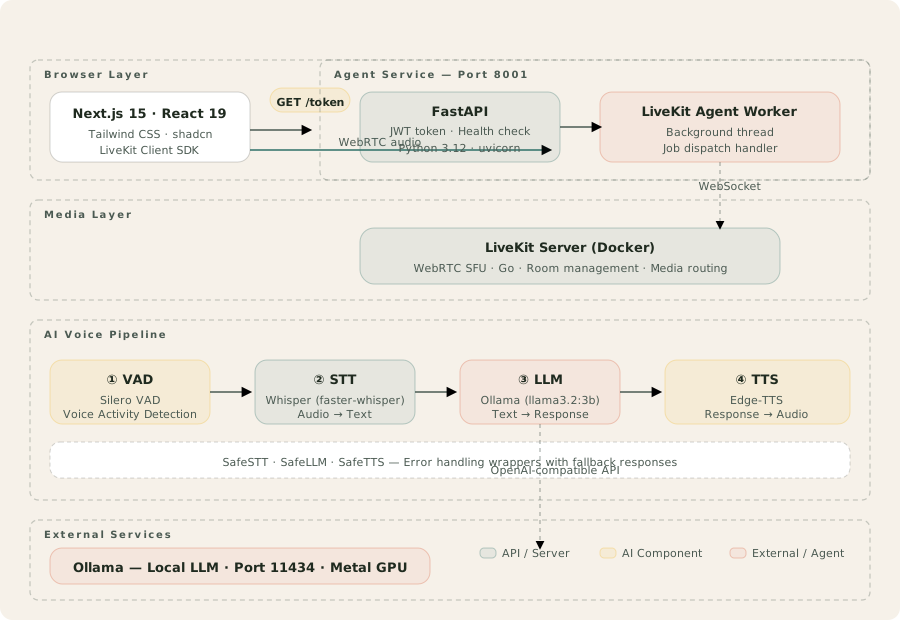
At a glance:
Browser → LiveKit (WebRTC) → Agent Worker → VAD → STT → LLM → TTS
                  ↕                         ↕
            LiveKit Server              Ollama (local)
Core components:
| Layer | Technology | Role |
|---|
| Frontend | Next.js 15, React 19, Agents UI | Voice interface with mic controls, audio visualizer, chat transcript |
| Agent Server | Python 3.12, FastAPI, LiveKit Agents SDK | JWT token generation, health check, pipeline orchestration |
| Media | LiveKit Server (Docker/Go) | WebRTC SFU, room management, job dispatch |
| VAD | Silero VAD | Speech segment and utterance boundary detection |
| STT | faster-whisper (large-v3-turbo) | Local speech-to-text transcription |
| LLM | Ollama (llama3.2:3b) | Local language model via OpenAI-compatible API |
| TTS | Edge-TTS | Online Microsoft Edge text-to-speech service (default, swappable) |
How LiveKit Agents Works
LiveKit Agents is the backbone of this system. It provides:
- WebRTC SFU — A Selective Forwarding Unit that routes media between browsers and agent workers
- PipelineAgent — A high-level abstraction that processes audio through config stages (VAD → STT → LLM → TTS)
- Job dispatch — When a user connects, LiveKit automatically dispatches a job to an available agent worker
- JWT authentication — Secure token-based room access with configurable permissions
The data flow is elegant:
- User opens
http://localhost:3000 in a browser
- Frontend calls
GET /token on FastAPI → receives a signed LiveKit JWT
- Browser connects to LiveKit Server via WebRTC using the JWT
- LiveKit dispatches a job to the Agent Worker (background thread)
- Agent processes audio through the voice pipeline
- Response audio streams back through LiveKit → browser plays it in real-time
The 4-Stage Voice Pipeline
Stage 1: VAD (Voice Activity Detection)
Silero VAD detects when speech starts and ends. This is critical for two reasons:
- Utterance detection — Know when the user has finished speaking so the pipeline can start processing
- Noise filtering — Silence and background noise are discarded before they reach the STT model
Silero is pre-trained and small (~1.7MB), and this build runs it on CPU. It operates on 30ms audio frames and returns a probability score between 0 and 1 for each frame.
Stage 2: STT (Speech-to-Text)
faster-whisper is a CTranslate2 implementation of OpenAI's Whisper model. This build uses it for local speech-to-text within the LiveKit pipeline.
The pipeline uses large-v3-turbo and enables the available Metal acceleration path on Apple Silicon. Audio is passed to the local model, and the resulting transcript is returned to the agent. This article does not claim a comparative speed or accuracy benchmark for that configuration.
The first run downloads the model (~3GB). Subsequent runs reuse the local cache.
Stage 3: LLM (Language Model)
Ollama serves Llama 3.2 3B locally via an OpenAI-compatible API. The agent sends transcribed text along with a system prompt, and Ollama streams tokens back.
The implementation consumes Ollama's streaming response through the OpenAI-compatible interface, so the configured model can be replaced without changing the rest of the pipeline. Runtime behavior varies with hardware, model, and configuration; this article does not assert a portable throughput or typical response-time benchmark.
The magic is that you can swap to any OpenAI-compatible provider at runtime. Just change .env:
LLM_PROVIDER=ollama  # or openai_compatible
LLM_MODEL=llama3.2:3b  # or llama-3.3-70b-versatile (Groq)
LLM_BASE_URL=http://localhost:11434/v1  # or https://api.groq.com/openai/v1
Stage 4: TTS (Text-to-Speech)
The default Edge-TTS provider sends response text to Microsoft Edge's online text-to-speech service. It produces natural-sounding speech with multiple voice options (en-US-AriaNeural is the default), but synthesis does not happen on the host.
The synthesized audio streams back into LiveKit's audio track for browser playback. The TTS provider remains swappable through configuration, preserving the same pipeline interface when a deployment selects a different service. Sub-2s voice-to-voice latency was observed in local development on Apple Silicon; it is not a controlled cross-hardware benchmark and not a guarantee.
Safe Wrappers: Error Resilience
Each pipeline stage has a Safe wrapper that catches failures and provides graceful fallbacks:
class SafeSTT:
    async def transcribe(self, audio: AudioFrame) -> str:
        try:
            return await self.stt.transcribe(audio)
        except Exception as e:
            logger.error(f"STT failed: {e}")
            return ""  # Empty transcript — LLM handles gracefully
This means a single model failure doesn't crash the entire conversation. If Whisper fails, the user gets a "I didn't catch that" response. If Ollama fails, TTS gets a fallback message. The conversation keeps going.
Frontend: Agents UI
The Next.js frontend uses LiveKit's Agents UI — a shadcn-based React component library:
- Audio visualizer — Real-time waveform display of microphone input
- Chat transcript — Scrollable conversation history with timestamps
- Mic controls — Mute/unmute, push-to-talk, and connection status
- Dark theme — Optimized for the voice-first interface
The frontend is deliberately minimal. The complexity lives in the agent pipeline, not the UI.
Provider Switching
The most powerful feature: every component of the pipeline is swappable at runtime. Here are three example configurations:
Local-first hybrid (default):
STT_PROVIDER=whisper
LLM_PROVIDER=ollama
TTS_PROVIDER=edge-tts
VAD, STT, and LLM run locally. Default Edge-TTS sends the generated response text to Microsoft Edge's online TTS service, so this configuration requires network access even though Edge-TTS does not require an API key.
Hosted STT alternative:
STT_PROVIDER=openai_compatible
STT_MODEL=whisper-1
STT_BASE_URL=https://api.openai.com/v1
# Add OPENAI_API_KEY to .env
This option routes transcription through OpenAI's Whisper API. It requires an API key and moves audio across an external network boundary; runtime behavior depends on the network and workload.
Hosted LLM hybrid:
LLM_PROVIDER=openai_compatible
LLM_MODEL=llama-3.3-70b-versatile
LLM_BASE_URL=https://api.groq.com/v1
# Add GROQ_API_KEY to .env
This variant sends LLM prompts to Groq, keeps Whisper STT on the host, and continues to use Microsoft Edge's online service for speech synthesis.
Quick Start
Start each part of the local stack in this order:
# 1. Start LiveKit Server (Docker)
cp .env.example .env
docker compose up -d

# 2. Pull LLM model
ollama pull llama3.2:3b

# 3. Start Agent Service
cd agent
python -m venv .venv && source .venv/bin/activate
pip install -r requirements.txt
python main.py

# 4. Start Frontend
cd frontend
npm install
npm run dev
Open http://localhost:3000 and click "Start audio". You're talking to a local-first voice AI with an online TTS boundary.
Key Takeaways
- LiveKit Agents is the right abstraction — It handles WebRTC complexity, media routing, job dispatch, and pipeline orchestration so you focus on the AI models
- Local-first pipelines can support real-time interaction — Local Whisper and Llama inference, paired with default online Edge-TTS, showed sub-2s voice-to-voice latency in local development on Apple Silicon; this is not a controlled cross-hardware benchmark or guarantee
- Provider swappability is essential — The ability to switch STT, LLM, or TTS at runtime (not rebuild time) makes the system adaptable to any environment
- Safe wrappers prevent cascade failures — A single model crash should never take down the conversation. Graceful degradation keeps the UX intact
- Docker for the hard parts — LiveKit Server runs in Docker. The agent and frontend run natively. This separation keeps service boundaries explicit and deployment flexible
Code & Resources
- Full source code: github.com/aiwithvd/voiceai
- Docker setup: One-command LiveKit server with
docker compose up -d
- Testing: 15 agent tests + 4 frontend tests +
--test-mode for CI
- Models: Silero VAD, faster-whisper, and Ollama run locally; the default Edge-TTS provider uses Microsoft Edge's online service
Want to build production voice AI systems? Let's connect. I advise teams on real-time AI architecture, voice pipeline design, and self-hosted deployment strategies.