Every AI engineer eventually faces the document processing problem: how do you turn a mess of PDFs, scanned images, and unstructured files into clean, structured data that your systems can actually use?
I recently built a Document Extraction Pipeline that processes thousands of documents daily. In this post, I'll share the architecture, key decisions, and lessons learned from taking it from prototype to production.
The Problem
Businesses are drowning in documents:
- Invoices that need data extraction for accounting
- Legal contracts requiring clause analysis
- ESG reports with structured sustainability metrics
- Forms that need automated processing
The challenge isn't just extracting text—it's extracting structured, validated data that integrates with downstream systems.
Architecture Overview
Here's the system I built:
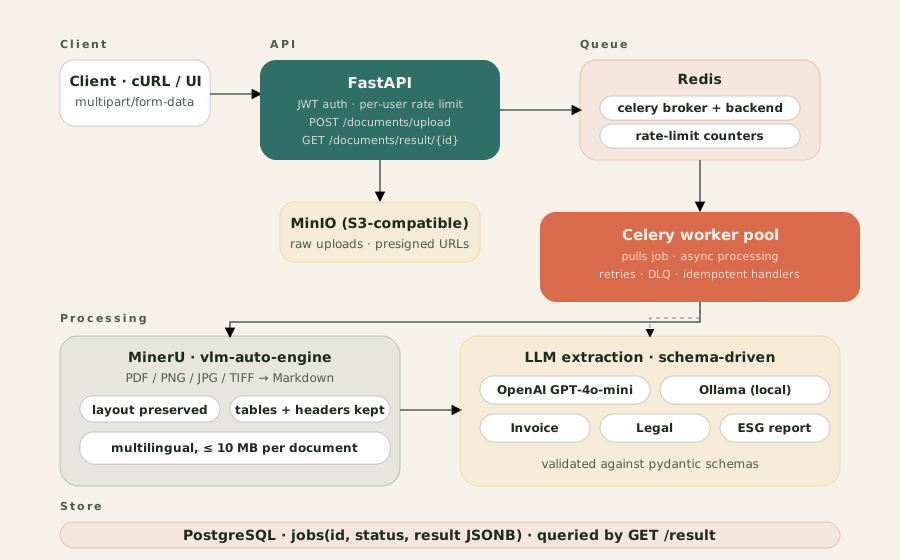
Tech Stack
| Component | Technology | Why |
|---|
| API Layer | FastAPI | Async support, automatic OpenAPI docs, Python-native |
| Task Queue | Celery + Redis | Background processing, rate limiting, retries |
| OCR/Layout | MinerU (vlm-auto-engine) | Structured Markdown output preserving tables, headers & multi-column layouts |
| LLM | OpenAI GPT-4o-mini / Ollama | Cloud or local inference, configurable via env vars |
| Storage | MinIO | S3-compatible, self-hosted, fast |
| Database | PostgreSQL + JSONB | Flexible schema for varying document types |
The Processing Pipeline
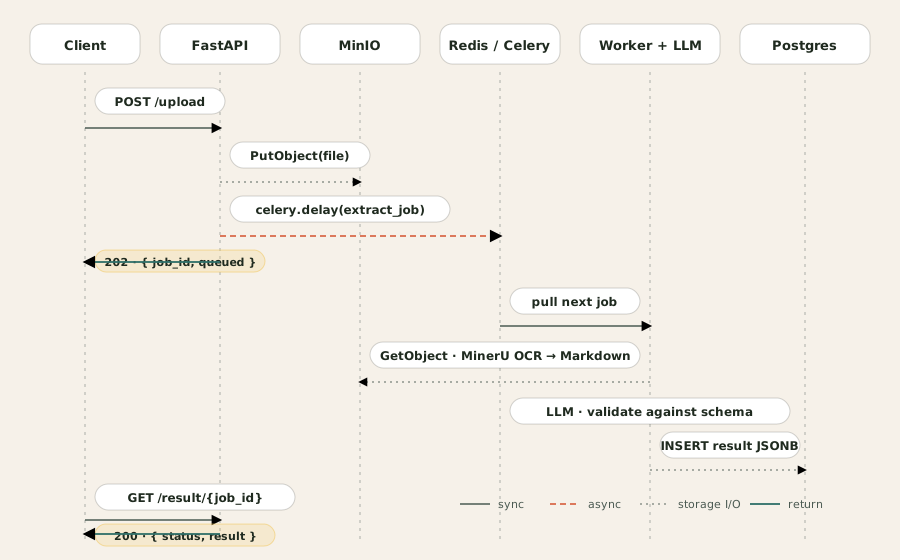
Upload → OCR → LLM Extraction → Validation → Storage
Here's the same pipeline as a request life-cycle — the API acknowledges the upload immediately, a worker does the heavy lifting asynchronously, and the client polls for the structured result:
Step 1: Document Upload
- Supports PDF, PNG, JPG, TIFF (up to 10MB)
- JWT authentication with per-user rate limits
- Async validation and virus scanning
Step 2: OCR & Layout Analysis
- MinerU's vlm-auto-engine converts PDFs and images to structured Markdown
- Tables, headers, and multi-column layouts are preserved (not flattened to raw text)
- Output is normalized and chunked for LLM consumption
Step 3: LLM-Powered Extraction
- Ollama runs locally for zero API costs
- Structured output using JSON schemas
- Support for Invoice, Legal, and ESG document types
Step 4: Data Validation
- Schema validation with Pydantic
- Business rule validation (e.g., "total must equal sum of line items")
- Confidence scoring for each extracted field
Key Implementation Details
Async Processing with Celery
from celery import Celery
from fastapi import BackgroundTasks

app = Celery('document_processor', broker='redis://localhost:6379')

@app.task(bind=True, max_retries=3)
def process_document(self, document_id: str):
    try:
        # 1. Download from storage
        doc = download_document(document_id)

        # 2. OCR & layout analysis with MinerU
        markdown_content = extract_with_mineru(doc)  # returns structured Markdown

        # 3. LLM structured extraction
        structured_data = extract_with_llm(markdown_content, schema=document.schema)

        # 4. Validate and save
        save_extraction_result(document_id, structured_data)

    except Exception as exc:
        # Retry with exponential backoff
        raise self.retry(exc=exc, countdown=2 ** self.request.retries)
Why Celery?
- Documents can take 5-30 seconds to process
- API stays responsive with immediate "processing" response
- Automatic retries handle transient failures
- Horizontal scaling by adding more workers
Local LLM with Ollama
from langchain_ollama import ChatOllama
from langchain_core.prompts import ChatPromptTemplate

llm = ChatOllama(
    model="llama3.2:3b",
    temperature=0.1,  # Low creativity for extraction
    format="json"     # Force JSON output
)

extraction_prompt = ChatPromptTemplate.from_template("""
Extract structured data from this document text.
Document type: {doc_type}
Schema: {schema}

Text:
{text}

Return ONLY valid JSON matching the schema.
""")

chain = extraction_prompt | llm
Why Ollama?
- Zero API costs - Critical for high-volume processing
- Data privacy - Documents never leave your infrastructure
- Low latency - No network round-trips to external APIs
- Customizable - Fine-tune models for your specific document types
Flexible Schema with PostgreSQL JSONB
CREATE TABLE extractions (
    id UUID PRIMARY KEY DEFAULT gen_random_uuid(),
    document_id UUID REFERENCES documents(id),
    doc_type VARCHAR(50),
    extracted_data JSONB,  -- Flexible schema per document type
    confidence_score FLOAT,
    created_at TIMESTAMP DEFAULT NOW()
);

-- Query examples
SELECT extracted_data->>'total_amount'
FROM extractions
WHERE doc_type = 'invoice'
  AND extracted_data->>'vendor' = 'Acme Corp';
Why JSONB?
- Invoices have different fields than legal contracts
- No schema migrations when adding new document types
- PostgreSQL indexes JSONB for fast queries
- Native JSON operators for flexible querying
Production Challenges & Solutions
Challenge 1: OCR Quality
Problem: Scanned documents with poor quality, complex layouts, or multi-column tables.
Solutions:
- MinerU vlm-auto-engine: Understands document layout natively — no manual deskew or preprocessing needed
- Structured Markdown output: Tables and multi-column text are preserved automatically, dramatically improving LLM extraction accuracy
- Confidence thresholds: Flag low-confidence extractions for human review
- Human-in-the-loop: Manual review queue for uncertain cases
Challenge 2: LLM Consistency
Problem: LLMs sometimes return malformed JSON or hallucinate fields.
Solutions:
- Structured output with Pydantic: Enforce schema at code level
- Retry logic: Regenerate on validation failures
- Temperature tuning: Lower temperature (0.1) for more deterministic outputs
- Few-shot prompting: Include examples in prompts
Challenge 3: Rate Limiting & Fair Use
Problem: Prevent abuse and ensure fair resource distribution.
Implementation:
from slowapi import Limiter, _rate_limit_exceeded_handler
from slowapi.util import get_remote_address

limiter = Limiter(key_func=get_remote_address)

@app.post("/upload")
@limiter.limit("10/minute")  # 10 uploads per minute per IP
async def upload_document(
    request: Request,
    file: UploadFile,
    current_user: User = Depends(get_current_user)
):
    # Per-user limits in addition to IP limits
    check_user_quota(current_user.id)
    ...
Challenge 4: Monitoring & Observability
What we track:
- Processing time per document
- OCR confidence scores
- LLM extraction accuracy
- Error rates by document type
- Queue depth and worker utilization
Tools:
- Prometheus for metrics
- Grafana for dashboards
- Structured logging with correlation IDs
Performance Results
After 3 months in production:
| Metric | Before (Manual) | After (Pipeline) | Improvement |
|---|
| Processing Time | 5-10 min/doc | 15-30 sec/doc | 20x faster |
| Accuracy | 85% | 94% | +9 points |
| Cost per doc | $0.50 (labor) | $0.02 (compute) | 96% cheaper |
| Throughput | 50/day | 1000+/day | 20x scale |
Key Takeaways
- Layout-aware OCR wins - MinerU's structured Markdown output dramatically improves LLM extraction accuracy vs raw text
- Async processing is essential - Don't block APIs on long-running tasks
- Local LLMs are viable - For high-volume, structured tasks, Ollama beats API costs
- Schema flexibility matters - JSONB lets you iterate without migrations
- Observability from day one - You can't improve what you don't measure
Code & Resources
What's Next?
Future improvements I'm working on:
- Fine-tuned models for specific document types
- Active learning pipeline to improve extraction quality
- Multi-language support beyond English
- Integration webhooks for real-time downstream updates
Need help building document processing pipelines? Let's connect. I advise teams on production AI architecture and implementation.